Player/Stage, MacPorts, and iPhone
Today I worked on setting up Player/Stage on my Macbook Pro with Leopard 10.5.6 and I ran into a few issues. I was using Macports 1.710 and I was attempting to install player-stage-player (2.03 2.1.2) and player-stage-stage (2.03 2.1.1) following a short guide at http://bentham.k2.t.u-tokyo.ac.jp/notebook/?p=247
If it's your first time using macports it can take a long time. I waited 2+ hours to download/build/install dependencies
I used the command:
$ sudo port install playerstage-player playerstage-stage
However it errored out at the end with the message:
$ sudo port install playerstage-player playerstage-stage
--->  Building playerstage-player
Error: Target org.macports.build returned: shell command " cd "/opt/local/var/macports/build/_opt_local_var_macports_sources_rsync.macports.org_release_ports_science_playerstage-player/work/player-2.0.4" && make all " returned error 2
Command output: building '_playerc' extension
swigging playerc.i to playerc_wrap.c
swig -python -o playerc_wrap.c playerc.i
playerc.i:44: Warning(124): Specifying the language name in %typemap is deprecated - use #ifdef SWIG instead.
playerc.i:82: Warning(124): Specifying the language name in %typemap is deprecated - use #ifdef SWIG instead.
playerc.i:121: Warning(124): Specifying the language name in %typemap is deprecated - use #ifdef SWIG instead.
playerc.i:127: Warning(124): Specifying the language name in %typemap is deprecated - use #ifdef SWIG instead.
gcc -fno-strict-aliasing -Wno-long-double -no-cpp-precomp -mno-fused-madd -fno-common -dynamic -DNDEBUG -g -Os -Wall -Wstrict-prototypes -DMACOSX -I/usr/include/ffi -DENABLE_DTRACE -arch i386 -arch ppc -pipe -I./../.. -I../../../.. -I/System/Library/Frameworks/Python.framework/Versions/2.5/include/python2.5 -c playerc_wrap.c -o build/temp.macosx-10.5-i386-2.5/playerc_wrap.o
playerc_wrap.c: In function '_wrap_playerc_mclient_client_set':
playerc_wrap.c:40301: warning: assignment from incompatible pointer type
playerc_wrap.c: In function '_wrap_playerc_mclient_addclient':
playerc_wrap.c:40504: warning: passing argument 2 of 'playerc_mclient_addclient' from incompatible pointer type
playerc_wrap.c: In function '_wrap_playerc_mclient_client_set':
playerc_wrap.c:40301: warning: assignment from incompatible pointer type
playerc_wrap.c: In function '_wrap_playerc_mclient_addclient':
playerc_wrap.c:40504: warning: passing argument 2 of 'playerc_mclient_addclient' from incompatible pointer type
gcc -Wl,-F. -bundle -undefined dynamic_lookup -arch i386 -arch ppc build/temp.macosx-10.5-i386-2.5/playerc_wrap.o -L./../../.libs -L../../../../libplayerxdr/.libs -L../../../../libplayercore/.libs -L../../../../libplayerjpeg/.libs -lplayerxdr -lplayerc -lplayerjpeg -ljpeg -lplayererror -o build/lib.macosx-10.5-i386-2.5/_playerc.so
ld: library not found for -ljpeg
collect2: ld returned 1 exit status
ld: library not found for -ljpeg
collect2: ld returned 1 exit status
lipo: can't open input file: /var/tmp//ccI9TvVp.out
(No such file or directory)
error: command 'gcc' failed with exit status 1
make[6]: *** [pythonbuild] Error 1
make[5]: *** [all] Error 2
make[4]: *** [all-recursive] Error 1
make[3]: *** [all-recursive] Error 1
make[2]: *** [all-recursive] Error 1
make[1]: *** [all-recursive] Error 1
make: *** [all] Error 2

Error: Status 1 encountered during processing.
[ad# Link Banner]
So I searched around the MacPorts website and I came across the ticket #18891, which basically said to run the following command to change the version of python being used from 3.0 to 2.5.
$ sudo port install python_select && sudo python_select python25
Skipping org.macports.activate (python_select +darwin_9) since this
port is already active
--->  Cleaning python_select
Selecting version "python25" for python
Following that command I was able to finish installing Player/Stage via MacPorts by using the orginal port command.
$ sudo port install playerstage-player playerstage-stage
--->  Building playerstage-player
--->  Staging playerstage-player into destroot
--->  Installing playerstage-player @2.0.4_2
--->  Activating playerstage-player @2.0.4_2
--->  Cleaning playerstage-player
--->  Fetching playerstage-stage
--->  Attempting to fetch stage-2.0.3.tar.bz2 from
http://voxel.dl.sourceforge.net/playerstage
--->  Verifying checksum(s) for playerstage-stage
--->  Extracting playerstage-stage
--->  Configuring playerstage-stage
--->  Building playerstage-stage
--->  Staging playerstage-stage into destroot
--->  Installing playerstage-stage @2.0.3_0
--->  Activating playerstage-stage @2.0.3_0
--->  Cleaning playerstage-stage
I tried to use player stage from MacPorts.
$ player /opt/local/var/macports/software/playerstage-stage\
/*/opt/local/share/stage/worlds/simple.cfg
And I received the error:
rr: unable to open color database /usr/X11R6/lib/X11/rgb.txt
 : No such file or directory (stage.c stg_lookup_color)
Following the advice from http://bentham.k2.t.u-tokyo.ac.jp/notebook/?cat=5 I added the following link.
$ sudo ln -s /usr/X11/share/X11/rgb.txt /usr/X11R6/lib/X11/rgb.txt
Now I am able to create a player server and connect with a client with the commands:
$ player /opt/local/var/macports/software/playerstage-stage\
/*/opt/local/share/stage/worlds/simple.cfg

/opt/local/var/macports/software/playerstage-player\
/*/opt/local/share/player/examples/libplayerc++/laserobstacleavoid
With the ability to run player/stage I will post again on my progress as I use an iPhone to run the Player client, rather than my Macbook Pro.
[caption id="attachment_209" align="alignleft" width="443" caption="Player client running on iPhone with Player/Stage."]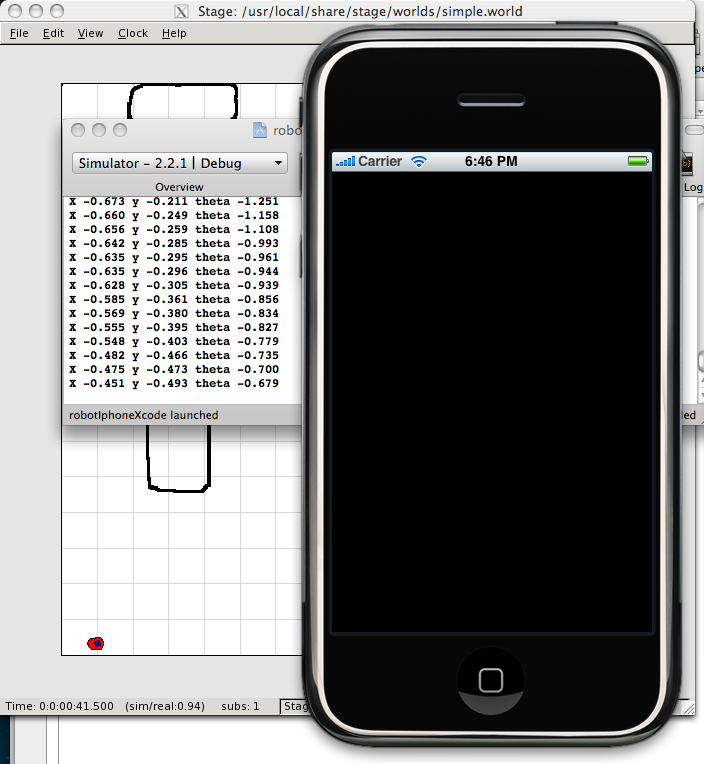
[ad#Large Box]