Paul Solt
Transparent UITableView with Custom Background UIView and Tap Gestures
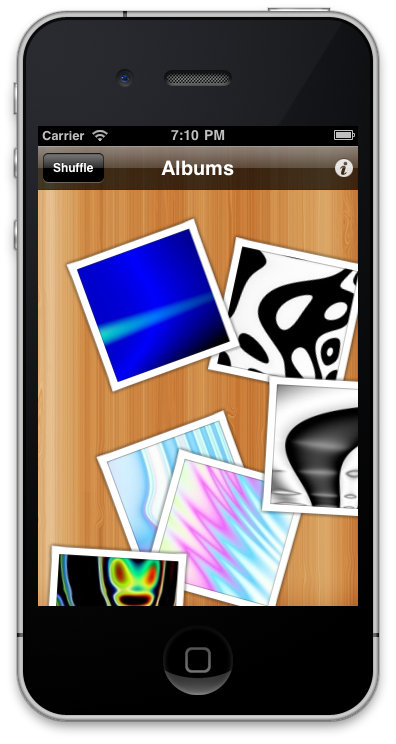
In order to create a custom background for a transparent UITableView you’ll need to do a few things. I’ve got the basic code below after a lot of tinkering. I’ve also included how to make it so you can hide the UITableView when you tap in the transparent areas below the rows using a UITapGestureRecognizer. In the images below you can see the custom view in action.
Key Points:
- Don’t subclass
UITableView, instead use it as a instance variable in your own custom UIViewController subclass. - Create a custom
UIViewsubclass to use as the background view, this will be visible when theUITableViewis hidden or has a transparent background view. - On iPad make sure you clear the UITableView’s
backgroundViewand set it tonilin addition to setting the background color to[UIColor clearColor] - Register a
UITapGestureRecognizerwith the viewController’s view and then set the attributecancelsTouchestoNOso that the touches from the gesture propagate to both theUITableViewand the custom background view. - In the
-(void)handleTapGesture:method you’ll want to send taps that don’t touch a row to toggle the UI so that theUITableViewhides or unhides.
Notes:
- I show a
UINavigationBar, so myUITableViewframe needs to take into account the size of the navigation bar. - Set the UILabel’s or custom views backgroundColor in the table’s cells to have
[UIColor clearColor]so that they animate and fade correctly.
See the sample code below:
6 Responses to Transparent UITableView with Custom Background UIView and Tap Gestures
Leave a Reply Cancel reply
Artwork Evolution
Facebook
@PaulSolt
- No public Twitter messages.
Github
Tags
Apple application testing App Store Artwork Evolution Boost bundle C++ cross platform development Dual Monitors Facebook Gears of War 2 gestures git GLUT iOS iPad iPhone iphone dev iphone dev 101 logic testing Mac Macbook Pro mac osx Mac OS X NSDocument Objective-C OCUnit OpenGL player/stage presentation remote control resource paths RIT SCM skillshare slides tdd testable code testing unit testing Windows XP Xbox 360 Xcode xcode 4


If you select one of your cells, I presume that would take the app to a detailView. Does the custom background also show in these subViews?
Thanks
I actually move to a new view when you press one of the cells. Checkout my app, Artwork Evolution, on the App Store.
I experimented with transparency to make my opening screen more interesting and interactive.
The downsides are that it’s not recommended since it uses a lot of transparency, which can lead to sluggish app responses.
This led me out of a dark corner, thanks!
@Jeffery glad to help!
Curious as to the reason for calling [super loadView] when the documentation for loadView specifically says not to?
“Your custom implementation of this method should not call super.” – Apple documentation
Hi Calvin,
Good point. The reason was that loadView would create the default self.view, otherwise it crashed. The fix is to change it to the code:
// [super loadView]; // remove loadView call and create a view for the current main screen with resizing masks
UIView *myView = [[UIView alloc] initWithFrame:[UIScreen mainScreen].applicationFrame];
myView.autoresizingMask = UIViewAutoresizingFlexibleHeight|UIViewAutoresizingFlexibleWidth;